On call with Sentry: a phone setup that works
A workable on-call setup with Sentry has three layers: a paging tool that wakes the on-call person for the few alerts that need it, a Slack or Teams channel for everything the team should see, and a phone app to read the issue and triage it once you're up. In Sentry, page only on uptime failures, critical metric or cron monitors and new high-priority production issues; send the rest to a channel with throttling. Instant, escalating pages should always come from a dedicated paging tool, not from email or chat.
Steps
- Sort signalsList your Sentry alerts and monitors and mark each as page, notify or ignore; page only on what someone must fix now.
- Connect a paging toolInstall your on-call tool's integration under Settings > Integrations, such as PagerDuty or Opsgenie, and connect the right service or team.
- Build the alertIn Monitors > Alerts, add one If/Then block that pages for high-priority production issues and one that posts everything else to a channel.
- Throttle and testSet Throttling and use Send Test Notification on every block before the rotation starts.
- Hand overAt the end of a shift, comment on each issue you touched and assign open ones to the next person.
Decide what pages and what only notifies
Most alert fatigue comes from paging on things nobody can fix at 3 a.m. Sort every Sentry signal into one of three buckets before you configure anything:
| Signal in Sentry | Page the on-call person | Notify a channel |
|---|---|---|
| Uptime monitor failing on a production URL | Yes | Also |
| Metric monitor on a critical threshold, e.g. crash rate above 1% or transaction volume dropping to zero | Yes | Also |
| Cron monitor for a job customers depend on (billing, sync) | Yes, after the failure tolerance | Also |
New issue, priority high, environment production, many users affected | Yes | Also |
| A resolved issue regresses | No | Owning team's channel |
| An issue escalates (medium to high, or flagged escalating) | Only for critical services | Yes |
| Medium and low priority issues, staging, warnings | No | Low-noise triage channel, throttled |
Use the failure tolerance on cron and uptime monitors so one blip does not page, and use the Issue priority and environment filters on alerts so staging never wakes anyone.
Route alerts to whoever is on call
Sentry does not keep on-call schedules itself; it hands alerts to a tool that does. In Monitors > Alerts, build one alert with several If/Then blocks: Sentry's own docs give the example of a Slack message for every new issue but a page to on-call only when the issue is high priority.
- PagerDuty: install under Settings > Integrations, connect services, then pick a service and severity in the alert action. Left on default, Sentry sends
criticalfor fatal,errorfor error,warningfor warning andinfofor info and debug issues. An incident from a critical monitor trigger with no warning threshold resolves itself when the Sentry alert resolves. - Opsgenie: Business or Enterprise plans; choose the team and priority. Sentry's docs note Atlassian has deprecated Opsgenie in favor of Jira Service Management.
- Others Sentry lists with alert support include All Quiet, PagerTree, Rootly, SIGNL4 and Spike.sh, plus Microsoft Teams, Discord and Slack for channels.
- Notify on preferred channel sends to Suggested Assignees, a team or a member through their own notification settings. It is useful for ownership, but it is not paging.
Set Throttling on every paging alert (options run from every trigger to 30 days) and click Send Test Notification on each block before the first night of the rotation.
Make the phone part reliable
- The paging app is the only thing that should be allowed through Do Not Disturb or your night-time Focus. Test it with a real test alert from Sentry, not a demo page from the vendor.
- Slack is for context, not waking up. By default Slack only pushes to mobile after you've been inactive on desktop, and a channel post is silent unless it mentions you; see Sentry Slack alerts.
- Quiet hours for everything else. Your Sentry email and chat notifications should stay quiet at night so the page stands out.
- A Sentry client signed in before your shift, with the right organization and production environment selected, so you're not resetting a password at 3 a.m.
Handover notes: at the end of a shift, comment on every issue you touched with what you found and what you changed, and assign anything still open to the next person. The comment lives on the issue, so the next engineer sees it when they open it from the next alert.
The first 5 minutes of an incident on a phone
- Acknowledge the page in your paging tool so it stops escalating, and say in the team channel that you have it.
- Open the issue and read the scope: events, users affected, first seen and the release. One user since a minute ago is different from 2,000 users since the last deploy.
- Check releases. If the first seen time matches a deploy, rolling back is usually faster than debugging. Compare crash-free sessions with the previous release.
- Read the top of the stack trace and the breadcrumbs for the last request or tap before the error; see how to read a stack trace.
- Triage: assign it to yourself, set the priority, and if it's noise, archive it until escalating rather than resolving it. Resolve only once the fix is out, or use resolve in next release.
The mistake people make next is resolving the issue as soon as the graph flattens. If the cause is still in production, it regresses an hour later and pages the next person. Leave a comment with what you saw, and get to a laptop if the fix needs code.
Where Triagebell fits (and where it doesn't)
Triagebell is not a paging tool. Its notifications are local: the app checks Sentry in the background roughly every 15 minutes when iOS allows, and notifies you of new fatal and error issues, regressions, firing alerts and failing crons. That is fine for keeping an eye on things during the day, but it is not instant and does not escalate, so keep a real paging integration for anything that must wake you. Quiet hours (23:00 to 07:00) let only fatal issues through.
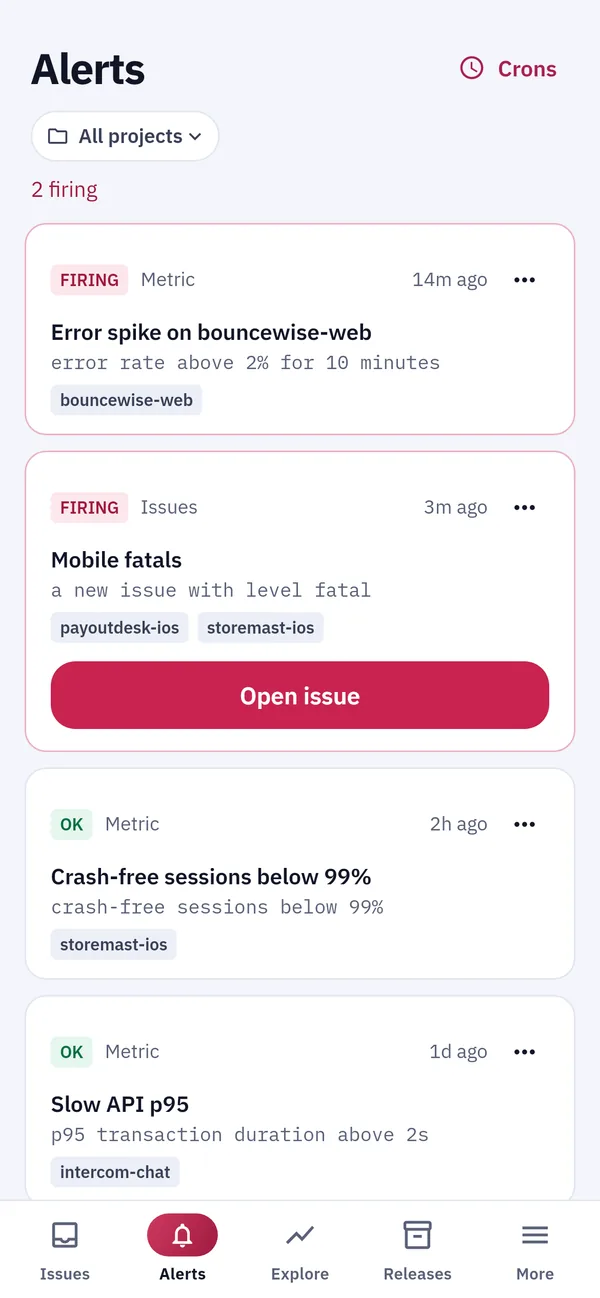
Once you're awake, it is where you do steps 2 to 5 above: issue counts, the stack trace with breadcrumbs, releases with crash-free sessions, resolve, assign, archive until escalating, priority and comments, and the Alerts and Crons tabs show which monitors are firing or failing.
Questions
Can Sentry page the on-call person directly?
Not by itself. Sentry sends alerts to an on-call tool through integrations such as PagerDuty or Opsgenie, which handle schedules, escalation and phone alerts.
Should every Sentry error page someone?
No. Page on uptime failures, critical metric or cron monitors and new high-priority production issues; send regressions and lower-priority issues to a team channel with throttling.
Is a phone app enough for on-call?
Only alongside a paging tool. Use the paging app to wake you and acknowledge, and a Sentry client on the phone to read the issue and triage it.
Does Triagebell send instant push notifications?
No. It sends local notifications from a background check roughly every 15 minutes when iOS allows, so use a paging integration for anything urgent.
Sources
- Creating an Alertdocs.sentry.io
- Monitorsdocs.sentry.io
- PagerDutydocs.sentry.io
- Integrationsdocs.sentry.io